 繁體中文
繁體中文当前位置: 首页 > 图文教程 > 网络编程 > Javascript > 学习ExtJS TextField常用方法
- Javascript
- Add a Table to a Word Document
- Add Formatted Text to a Word Document
- 用jscript实现新建word文档
- 用jscript实现新建和保存一个word文档
- Open and Print a Word Document
- Use Word to Search for Files
- Convert Seconds To Hours
- Sample script that deletes a SQL Server database
- Sample script that displays all of the users in a given SQL Server DB
- firefox中用javascript实现鼠标位置的定位
- div+css实现鼠标放上去,背景跟图片都会变化。
- Locate a File Using a File Open Dialog Box
- Save a File Using a File Save Dialog Box
- 用jscript实现列出安装的软件列表
- List the Stored Procedures in a SQL Server database
- Display SQL Server Login Mode
- Display SQL Server Version Information
- List all the Databases on a SQL Server
- 用jscript启动sqlserver
- Stop SQL Server
 Javascript 中的 学习ExtJS TextField常用方法
出处:互联网 整理: 软晨网(RuanChen.com) 发布: 2009-10-10 浏览: 623 ::

收藏到网摘: n/a


ExtJS TextField常用方法 一、属性
fieldLabel:标签名称。
labelWidth:标签宽度。
ID:文件框ID。
二、构造参数
listeners:在对象初始化之前,将一系列事件进行绑定。
三、函数
getCmp(string _id):得到id为_id的组件对象。
getValue():得到文件框值。
四、其它
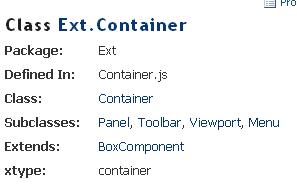
layout:只在在此布局下才能正确显示文件框的标签名,布局的宿主对象必面
是Ext.Container或者Ext.Container的子类。
在应用FormLayout布局时只要在宿主对象的构造参数中指定layout:"form"即可。
五、应用举例
复制代码 代码如下:
Ext.onReady(function(){
var _panel = new Ext.Panel({
renderTo:Ext.getBody(),
layout:"form",
labelWidth:30,
listeners:{
"render":function(_panel){
_panel.add(new Ext.form.TextField({
id:"txt_name",
fieldLabel:"姓名"
})) ;
}
}}) ;
new Ext.Button({
text:"确 定",
renderTo:Ext.getBody(),
handler:function(){
alert(Ext.getCmp("txt_name").getValue()) ;
}
}) ;
}) ;
 评论 (0) All
