 繁體中文
繁體中文当前位置: 首页 > 图文教程 > 网络编程 > Javascript > 学习ExtJS TextField常用方法
- Javascript
- form中限制文本字节数js代码
- use jscript with List Proxy Server Information
- use jscript List Installed Software
- List Installed Software Features
- List Information About the Binary Files Used by an Application
- List the Codec Files on a Computer
- List the UTC Time on a Computer
- List Installed Hot Fixes
- excel操作之Add Data to a Spreadsheet Cell
- Add Formatted Data to a Spreadsheet
- Apply an AutoFormat to an Excel Spreadsheet
- JavaScript语法着色引擎(demo及打包文件下载)
- 类之Prototype.js学习
- 一款JavaScript压缩工具:X2JSCompactor
- iis6+javascript Add an Extension File
- jscript之Open an Excel Spreadsheet
- jscript之Read an Excel Spreadsheet
- jscript之List Excel Color Values
- 去除图像或链接黑眼圈的两种方法总结
- Add a Formatted Table to a Word Document
 Javascript 中的 学习ExtJS TextField常用方法
出处:互联网 整理: 软晨网(RuanChen.com) 发布: 2009-10-10 浏览: 619 ::

收藏到网摘: n/a


ExtJS TextField常用方法 一、属性
fieldLabel:标签名称。
labelWidth:标签宽度。
ID:文件框ID。
二、构造参数
listeners:在对象初始化之前,将一系列事件进行绑定。
三、函数
getCmp(string _id):得到id为_id的组件对象。
getValue():得到文件框值。
四、其它
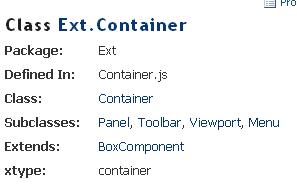
layout:只在在此布局下才能正确显示文件框的标签名,布局的宿主对象必面
是Ext.Container或者Ext.Container的子类。
在应用FormLayout布局时只要在宿主对象的构造参数中指定layout:"form"即可。
五、应用举例
复制代码 代码如下:
Ext.onReady(function(){
var _panel = new Ext.Panel({
renderTo:Ext.getBody(),
layout:"form",
labelWidth:30,
listeners:{
"render":function(_panel){
_panel.add(new Ext.form.TextField({
id:"txt_name",
fieldLabel:"姓名"
})) ;
}
}}) ;
new Ext.Button({
text:"确 定",
renderTo:Ext.getBody(),
handler:function(){
alert(Ext.getCmp("txt_name").getValue()) ;
}
}) ;
}) ;
 评论 (0) All
