 繁體中文
繁體中文当前位置: 首页 > 图文教程 > 网络编程 > Javascript > Extjs学习笔记之一 初识Extjs之MessageBox
- Javascript
- [JS源码]超长文章自动分页(客户端版)
- 注意 JavaScript 中 RegExp 对象的 test 方法
- JavaScript快速排序
- 写的一段拖动对象的代码
- 用js取得鼠标所在位置的对象
- 如何在一段文字里点一下就可以在里面插入一段文字?
- 用js+cookie记录滚动条位置
- 记录滚动条位置(使用userdate)
- 强效、方便的表单通用检测JS 不错
- 个人总结的一些关于String、Function、Array的属性和用法
- 数据排序谁最快(javascript中的Array.prototype.sort PK 快速排序)
- Prototype最新版(1.5 rc2)使用指南(1)
- Prototype使用指南之string.js
- Prototype使用指南之base.js
- Prototype使用指南之enumerable.js
- Prototype使用指南之array.js
- Prototype使用指南之range.js
- Prototype使用指南之ajax
- Prototype使用指南之dom.js
- Prototype使用指南之selector.js
 Javascript 中的 Extjs学习笔记之一 初识Extjs之MessageBox
出处:互联网 整理: 软晨网(RuanChen.com) 发布: 2010-01-10 浏览: 687 ::

收藏到网摘: n/a


去官网下载好extjs的压缩包,解压缩之后得到如下目录结构。
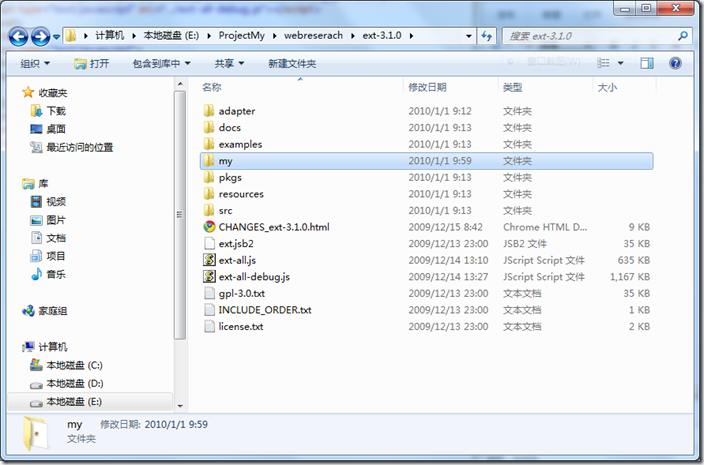
在其中新建一个my目录,以后所有的样例文件都新建在这个目录中。
1.Hello world!
先看一个Extjs版的Hello World网页的全部代码:
复制代码 代码如下:
<html>
<head>
<title>Extjs MessageBox</title>
<link rel="Stylesheet" type="text/css" href="../resources/css/ext-all.css" />
<script type="text/javascript" src="../adapter/ext/ext-base-debug.js"></script>
<script type="text/javascript" src="../ext-all-debug.js"></script>
</head>
<body>
<script type="text/javascript">
Ext.BLANK_IMAGE_URL = '../resources/images/default/s.gif';
Ext.onReady(function() {
Ext.MessageBox.alert('Hello', 'Hello world');
});
</script>
</body>
</html>
运行下,结果如下:

注意上面引入js文件的顺序不能颠倒,否则不能得到正确的结果。2.Ext.MessageBox
Ext.MessageBox实现了常见的提示框功能。Ext.Msg是和他完全相同的对象,只是名字不一样而已。Ext.Msg有常见的alert,confirm,promt,show等方法,都很简单。下面通过例子来说明。Extjs的函数参数可以用通常的逗号列表分隔,也可以传入一个具有参数名:参数值的对象。下面的例子也会有体现。
复制代码 代码如下:
<html>
<head>
<title>Extjs MessageBox</title>
<link rel="Stylesheet" type="text/css" href="../resources/css/ext-all.css" />
<script type="text/javascript" src="../adapter/ext/ext-base-debug.js"></script>
<script type="text/javascript" src="../ext-all-debug.js"></script>
<script type="text/javascript">
function alertClick() {
Ext.Msg.alert("alert", "Hello");
}
function showOutput(s) {
var area = document.getElementById("Output");
area.innerHTML = s;
}
function confirmClick() {
Ext.Msg.confirm('Confirm','Choose one please',showOutput);
}
function promptClick() {
Ext.Msg.prompt('Prompt', 'Try enter something',
function(id, msg) {
showOutput('You pressed ' + id + ' key and entered ' + msg);
});
}
function showClick() {
var option = {
title:'Box Show',
msg: 'This is a most flexible messagebox with an info icon.',
modal: true,
buttons: Ext.Msg.YESNOCANCEL,
icon: Ext.Msg.INFO,
fn:showOutput
};
Ext.Msg.show(option);
showOutput("Hi, a box is promting,right?");
}
</script>
</head>
<body>
<div id='Output'></div>
<p><button id='Button1' onclick='alertClick()'>AlertButton</button></p>
<p><button id='Button2' onclick='confirmClick()'>ConfirmButton</button></p>
<p><button id='Button3' onclick='promptClick()'>PromptButton</button></p>
<p><button id='Button4' onclick='showClick()'>ShowButton</button></p>
</body>
</html>
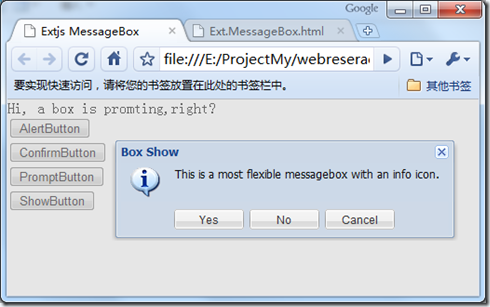
Msg的各个方法的参数是类似的,主要是设置标题和提示语,以及对按钮的设置。要注意Msg的消息框和javascript默认的提示框不一样,它的弹出并不会阻止其余的代码的执行。要在弹出框被关闭之后执行某些代码必须向它传入一个函数,fn。最后一个例子很清晰的显示了这一点,弹出提示框后,下面的代码仍然被执行,弹出框关闭后执行showOutput函数:
 评论 (0) All
