 繁體中文
繁體中文当前位置: 首页 > 图文教程 > 网络编程 > Javascript > javascript showModalDialog模态对话框使用说明
- Javascript
- javaScript 数值型和字符串型之间的转换
- 从父页面读取和操作iframe中内容方法
- IE DOM实现存在的部分问题及解决方法
- jqPlot Option配置对象详解
- jquery JSON的解析方式
- JavaScript 捕获窗口关闭事件
- xml 封装与解析(javascript和C#中)
- JavaScript 设计模式学习 Singleton
- JavaScript 设计模式学习 Factory
- javascript CSS画图之基础篇
- JavaScript 获取事件对象的注意点
- JavaScript Konami Code 实现代码
- Google Map API更新实现用户自定义标注坐标
- JavaScript this 深入理解
- javascript EXCEL 操作类代码
- window.parent调用父框架时 ie跟火狐不兼容问题
- 关于取不到由location.href提交而来的上级页面地址的解决办法
- JS input 数字验证代码
- 网页全屏显示代码说明分析
- JS 学习笔记 防止发生命名冲突
 Javascript 中的 javascript showModalDialog模态对话框使用说明
出处:互联网 整理: 软晨网(RuanChen.com) 发布: 2010-01-10 浏览: 674 ::

收藏到网摘: n/a


使用javascript打开模态对话框,想学习showModalDialog使用方法的朋友可以参考下。 1. 标准的方法
复制代码 代码如下:
<script type="text/javascript">
function openWin(src, width, height, showScroll){
window.showModalDialog (src,"","location:No;status:No;help:No;dialogWidth:"+width+";dialogHeight:"+height+";scroll:"+showScroll+";");
}
</script>
例:<span style="CURSOR: pointer" onclick="openWin'http://www.ruanchen.com', '500px', '400px', 'no')">点击</span>
2. 要注意的是,Firefox并不支持该功能,它支持的语法是
复制代码 代码如下:
window.open
('openwin.html','newWin', 'modal=yes, width=200,height=200,resizable=no, scrollbars=no' );
3. 如何自动判断浏览器
复制代码 代码如下:
<input type="button" value="打开对话框" onclick="showDialog('#')"/>
<SCRIPT LANGUAGE="JavaScript">
<!--
function showDialog(url)
{
if( document.all ) //IE
{
feature="dialogWidth:300px;dialogHeight:200px;status:no;help:no";
window.showModalDialog(url,null,feature);
}
else
{
//modelessDialog可以将modal换成dialog=yes
feature ="width=300,height=200,menubar=no,toolbar=no,location=no,";
feature+="scrollbars=no,status=no,modal=yes";
window.open(url,null,feature);
}
}
//-->
</SCRIPT>
4. 在IE中,模态对话框会隐藏地址栏,而在其他浏览器则不一定


【注意】在谷歌浏览器中,这个模态的效果也会失效。
5. 一般在弹出对话框的时候,我们都希望整个父页面的背景变为一个半透明的颜色,让用户看到后面是不可以访问的

而关闭对话框之后又希望还原


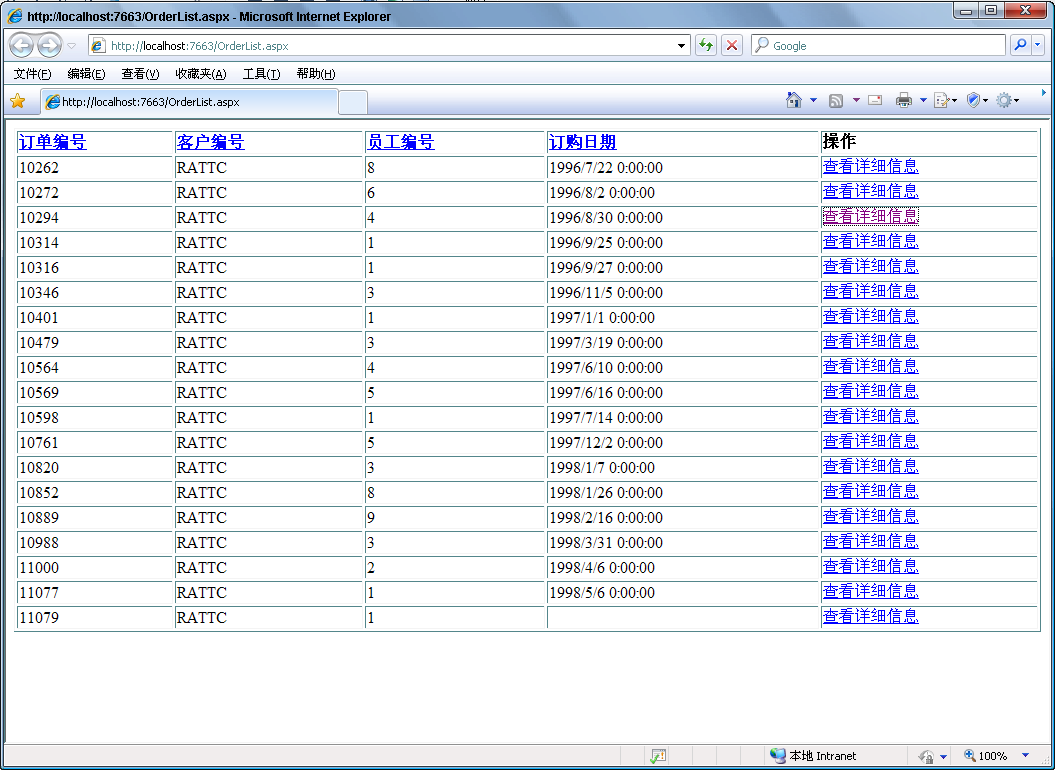
这是怎么做到的呢?
复制代码 代码如下:
///显示某个订单的详细信息,通过一个模态对话框,而且屏幕会变颜色
function ShowOrderDetails(orderId) {
var url = "details.aspx?orderID=" + orderId;
//$("body").css("filter", "Alpha(Opacity=20)");
//filter:Alpha(Opacity=50)
$("body").addClass("body1");
ShowDetailsDialog(url, "600px", "400px", "yes");
$("body").removeClass("body1");
}
另外,有一个样式表定义
复制代码 代码如下:
.body1
{
background-color:#999999;
filter:Alpha(Opacity=40);
}
6. 如何在页面之间传递数值
showModalDialog 传值及刷新
(一)showModalDialog使用例子,父窗口向子窗口传递值,子窗口设置父窗口的值,子窗口关闭的时候返回值到父窗口.
farther.html
复制代码 代码如下:
<!DOCTYPE HTML PUBLIC "-//W3C//DTD HTML 4.0 Transitional//EN">
<HTML>
<HEAD>
<TITLE>New Document </TITLE>
<META content="EditPlus" name="Generator">
<META content="" name="Author">
<META content="" name="Keywords">
<META content="" name="Description">
<script language="javascript">
<!--
function openChild(){
var k = window.showModalDialog("child.html",window,"dialogWidth:335px;status:no;dialogHeight:300px");
if(k != null)
document.getElementById("txt11").value = k;
}
//-->
</script>
</HEAD>
<BODY>
<FONT face="宋体"></FONT>
<br>
传递到父窗口的值:<input id="txt9" type="text" value="3333333333333" name="txt9"><br>
返回的值:<input id="txt11" type="text" name="txt11"><br>
子窗口设置的值:<input id="txt10" type="text" name="txt10"><br>
<input id="Button1" onclick="openChild()" type="button" value="openChild" name="Button1">
</BODY>
</HTML>
child.html
复制代码 代码如下:
<!DOCTYPE HTML PUBLIC "-//W3C//DTD HTML 4.0 Transitional//EN">
<HTML>
<HEAD>
<TITLE>New Document </TITLE>
<META content="EditPlus" name="Generator">
<META content="" name="Author">
<META content="" name="Keywords">
<META content="" name="Description">
<meta http-equiv="Expires" content="0">
<meta http-equiv="Cache-Control" content="no-cache">
<meta http-equiv="Pragma" content="no-cache">
</HEAD>
<BODY>
<FONT face="宋体"></FONT>
<br>
父窗口传递来的值:<input id="txt0" type="text" name="txt0"><br>
输入要设置父窗口的值:<input id="txt1" type="text" name="txt1"><input id="Button1" onclick="setFather()" type="button" value="设置父窗口的值" name="Button1"><br>
输入返回的值:<input id="txt2" type="text" name="txt2"><input id="Button2" onclick="retrunValue()" type="button" value="关闭切返回值" name="Button2">
<input id="Button3" onclick="" type="button" value="关闭刷新父窗口" name="Button3">
<script language="javascript">
<!--
var k=window.dialogArguments;
//获得父窗口传递来的值
if(k!=null)
{
document.getElementById("txt0").value = k.document.getElementById("txt9").value;
}
//设置父窗口的值
function setFather()
{
k.document.getElementById("txt10").value = document.getElementById("txt1").value
}
//设置返回到父窗口的值
function retrunValue()
{
var s = document.getElementById("txt2").value;
window.returnValue=s;
window.close();
}
//-->
</script>
</BODY>
</HTML>
说明:
由于showModalDialog缓存严重,下面是在子窗口取消客户端缓存的设置.也可以在服务器端取消缓存,参考:
http://adandelion.cnblogs.com/articles/252137.html
<meta http-equiv="Expires" CONTENT="0">
<meta http-equiv="Cache-Control" CONTENT="no-cache">
<meta http-equiv="Pragma" CONTENT="no-cache">
二)下面是关闭刷新父窗口的例子
farther.html
复制代码 代码如下:
<!DOCTYPE HTML PUBLIC "-//W3C//DTD HTML 4.0 Transitional//EN">
<HTML>
<HEAD>
<TITLE>New Document </TITLE>
<META NAME="Generator" CONTENT="EditPlus">
<META NAME="Author" CONTENT="">
<META NAME="Keywords" CONTENT="">
<META NAME="Description" CONTENT="">
<script language="javascript">
<!--
function openChild()
{
var k = window.showModalDialog("child.html",window,"dialogWidth:335px;status:no;dialogHeight:300px");
if(k == 1)//判断是否刷新
{
alert('刷新');
window.location.reload();
}
}
//-->
</script>
</HEAD>
<BODY>
<br>
传递到父窗口的值:<input id="txt9" type="text" value="3333333333333" NAME="txt9"><br>
<input type="button" value="openChild" onclick="openChild()" ID="Button1" NAME="Button1">
</BODY>
</HTML>
child.html
复制代码 代码如下:
<!DOCTYPE HTML PUBLIC "-//W3C//DTD HTML 4.0 Transitional//EN">
<HTML>
<HEAD>
<TITLE>New Document </TITLE>
<META content="EditPlus" name="Generator">
<META content="" name="Author">
<META content="" name="Keywords">
<META content="" name="Description">
<meta http-equiv="Expires" content="0">
<meta http-equiv="Cache-Control" content="no-cache">
<meta http-equiv="Pragma" content="no-cache">
</HEAD>
<BODY>
<FONT face="宋体"></FONT>
<br>
父窗口传递来的值:<input id="txt0" type="text" name="txt0"><br>
<input id="Button1" onclick="winClose(1)" type="button" value="关闭刷新父窗口" name="Button1">
<input id="Button2" onclick="winClose(0)" type="button" value="关闭不刷新父窗口" name="Button2">
<script language="javascript">
<!--
var k=window.dialogArguments;
//获得父窗口传递来的值
if(k!=null)
{
document.getElementById("txt0").value = k.document.getElementById("txt9").value;
}
//关闭窗口返回是否刷新的参数.
function winClose(isRefrash)
{
window.returnValue=isRefrash;
window.close();
}
//-->
</script>
</BODY>
</HTML>
说明
1.下面是取消客户端缓存的:
<meta http-equiv="Expires" CONTENT="0">
<meta http-equiv="Cache-Control" CONTENT="no-cache">
<meta http-equiv="Pragma" CONTENT="no-cache">
也可以在服务器端取消缓存,参考:
http://adandelion.cnblogs.com/articles/252137.html
2.向父窗口传递阐述在ASP.NET中也可以是用aaa.aspx?id=1的方式传递.
3.不刷新父窗口的话在父窗口中直接这样一来设置可以.
<script>
window.showModalDialog("child.html",window,"dialogWidth:335px;status:no;dialogHeight:300px");
</script>
4.在子窗口中若要提交页面的话要加入:,这样就不会打开新窗口了.
<head>
<base target="_self">
</HEAD>
 评论 (0) All
