 繁體中文
繁體中文当前位置: 首页 > 图文教程 > 网络编程 > Javascript > Aptana调试javascript图解教程
- Javascript
- Add a Table to a Word Document
- Add Formatted Text to a Word Document
- 用jscript实现新建word文档
- 用jscript实现新建和保存一个word文档
- Open and Print a Word Document
- Use Word to Search for Files
- Convert Seconds To Hours
- Sample script that deletes a SQL Server database
- Sample script that displays all of the users in a given SQL Server DB
- firefox中用javascript实现鼠标位置的定位
- div+css实现鼠标放上去,背景跟图片都会变化。
- Locate a File Using a File Open Dialog Box
- Save a File Using a File Save Dialog Box
- 用jscript实现列出安装的软件列表
- List the Stored Procedures in a SQL Server database
- Display SQL Server Login Mode
- Display SQL Server Version Information
- List all the Databases on a SQL Server
- 用jscript启动sqlserver
- Stop SQL Server
 Javascript 中的 Aptana调试javascript图解教程
出处:互联网 整理: 软晨网(RuanChen.com) 发布: 2010-01-10 浏览: 532 ::

收藏到网摘: n/a


用Aptana软件来调试javascript的方法,一般情况下大家都使用firefox浏览器+firebug来调试的。 前提是安装 Firebug 插件 和aptanadebugger 插件,他们的下载地址如下:
http://getfirebug.com/releases/firebug/1.2/firebug-1.2.0.xpi
http://firefox.aptana.com/update/aptanadebugger.xpi
开始调试:
选择你所需要的调试的html文件,右键点击"Debug As" 下的 “Debug...” ,其中左侧菜单中要选用 “Web Browser”,右侧的"Main" 选项卡中的 "Browser executable"中一定要填写正确的firefox.exe文件的路径,其他的默认即可,如下图:
 点击 “Debug” 按钮进入调试视图,(aptana 同时会打开firefox浏览器),如下图:
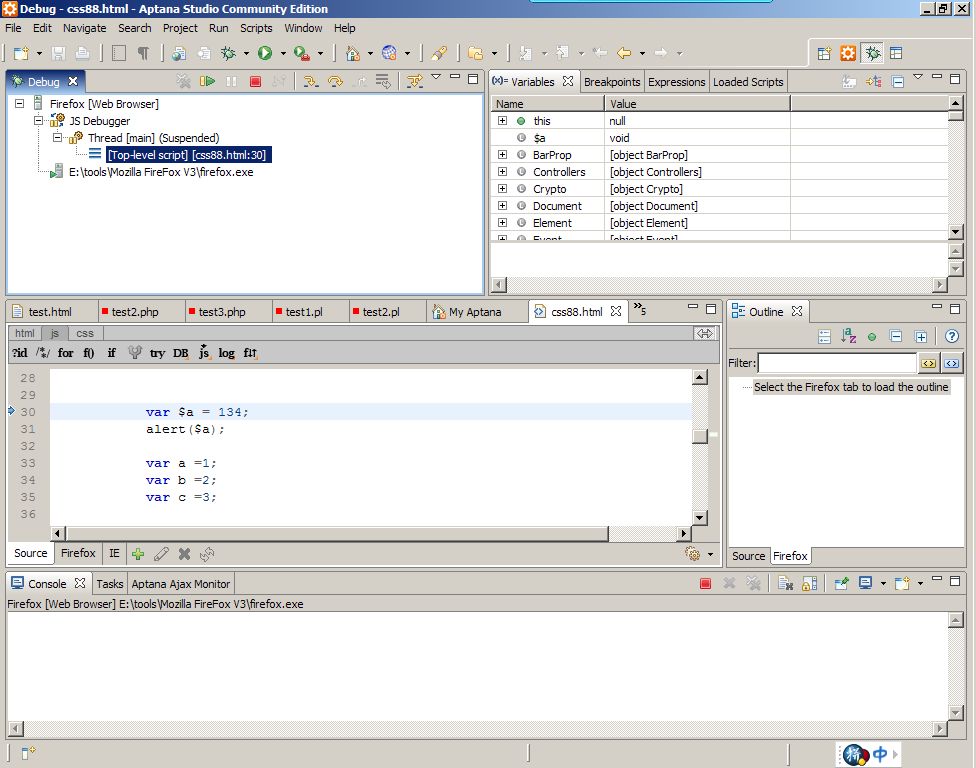 另外:
另外:如果运行debug没有相应,可以右键点击“Relaunch” 在试,如图:
 有的时候在Debug选项面板中没有 "Web Browser" 菜单 只有 “Remote JS” 菜单,如图:
 解决办法如下:
“Window” -> "Preferences" -> "Run/Debug" -> Launching -> Launch Configuration
将右侧 "Web Browser" 中的勾去掉。

 评论 (0) All
