 繁體中文
繁體中文当前位置: 首页 > 图文教程 > 网络编程 > ASP > asp编译成dll-图形化教程
- ASP
- 用ASP编写网络传呼机
- 用ASP+CSS实现随机背景
- ASP下载系统防盗链方法
- 用ASP编写下载网页中所有资源的程序
- Request.ServerVariables应用
- 解决Asp程序的Server.CreateObject错误
- ASP实现TCP端口扫描的方法
- 源码实例:ASP实现远程保存图片
- 用ASP+DLL实现WEB方式修改服务器时间
- ASP使用MySQL数据库全攻略
- ASP+SQL Server构建网页防火墙
- 教程/ASP 十天学会ASP之第二天
- 教程/ASP 十天学会ASP之第四天
- 教程/ASP 十天学会ASP之第五天
- 教程/ASP 十天学会ASP之第六天
- 教程/ASP 十天学会ASP之第七天
- 教程/ASP 十天学会ASP之第八天
- 教程/ASP 十天学会ASP之第九天
- 教程/ASP 十天学会ASP之第十天
- 关于学习ASP和编程的28个观点
 ASP 中的 asp编译成dll-图形化教程
出处:互联网 整理: 软晨网(RuanChen.com) 发布: 2009-09-13 浏览: 405 ::

收藏到网摘: n/a


1 。打开您的Microsoft Visual Basic:
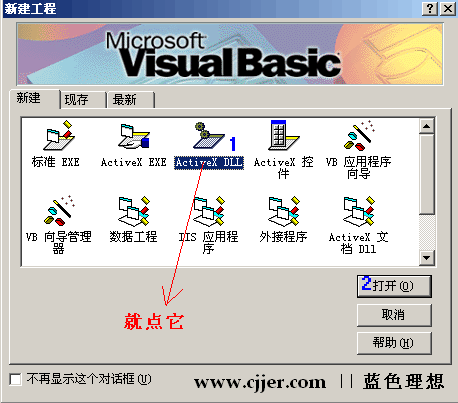
点击确定,以下就按照蓝色的数字步骤.
2 。修改工程名和类模块的名称:
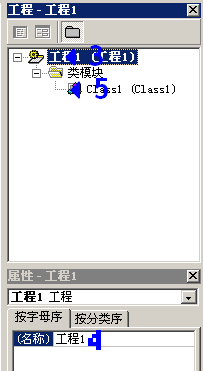
点3,把4改成bi,再点5:
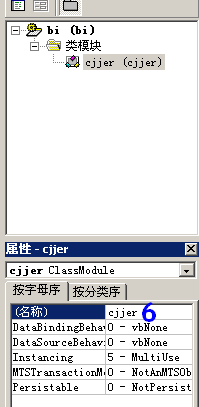
6处改成cjjer.
3。增加到引用asp:
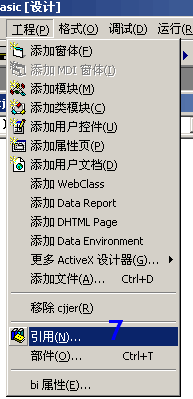
点击引用,然后选择其中的Microsoft Active Server Pages Object Library.
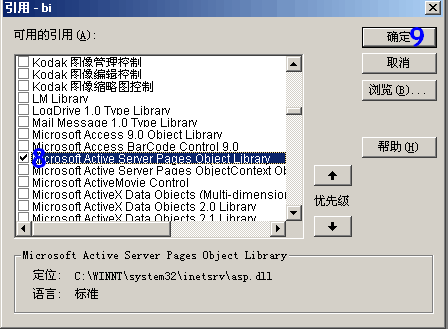
点9确定.
4。编写代码:
Option Explicit
Private Context As ScriptingContext
Private Application As Application
Private Response As Response
Private Request As Request
Private Session As Session
Private Server As Server
Public Sub OnStartPage(PassedscriptContext As ScriptingContext)
Set Context = PassedscriptContext
Set Application = Context.Application
Set Request = Context.Request
Set Response = Context.Response
Set Server = Context.Server
Set Session = Context.Session
End Sub
Public Sub showsuc()
Response.Write "我是蓝色理想的老农,您好"
End Sub
' 释放内部对象
Public Sub OnEndPage()
Set Application = Nothing
Set Request = Nothing
Set Response = Nothing
Set Server = Nothing
Set Session = Nothing
Set Context = Nothing
End Sub
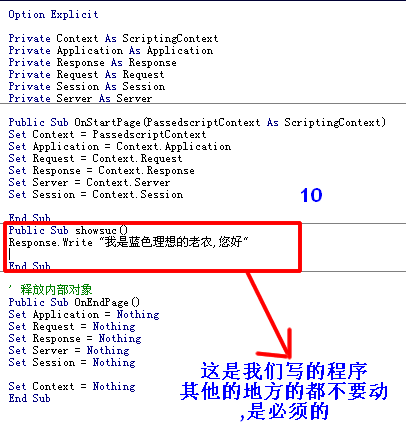
其中,除10处,其他都是必须的.
10处是我们自己要表现的程序.
ctrl+s保存在d:\mylib\cjjer.cls
在把工程保存为d:\mylib\bi.vbp
5 。编译,注册成dll:
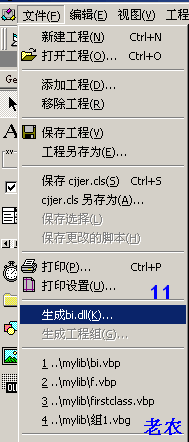
点击生成bi.dll
没啥警告的话那就ok了,路径保存在d:\mylib\bi.dll.
然后开始--------->运行-->
regsvr32 d:\mylib\bi.dll
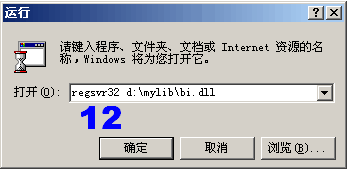
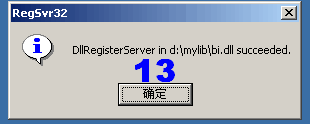
这就注册成功了.
6。使用bi.dll:
新建asp文件,输入:
<%
Dim bicjjer
Set bicjjer=Server.CreateObject("bi.cjjer")
bicjjer.showsuc()
%>
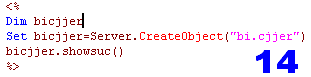
浏览器,预览,显示如下:

注意:对已经存在的组建名称或这修改了dll文件,必须先停止IIS,再重启注册使用,否则会一直在原来的基础上.
另外补充一点:生成的dll文件不注册到服务器也可以使用:
<% @ language="vbscript" %>
<!--METADATA TYPE="typelib" FILE="e:\web\web\asp\bi\bi.dll"-->
<%
Dim bicjjer
Set bicjjer=Server.CreateObject("bi.cjjer")
bicjjer.showsuc()
%>
这绝对是个好消息,有人说这个没什么价值,那我说"您还是固陋寡闻或者您技术高的藐视dll...",哈哈哈,当然是玩笑了,注意,METADATA的file路径是绝对的物理路径,否则无法装载.
 评论 (0) All
