 繁體中文
繁體中文当前位置: 首页 > 图文教程 > 网页制作 > CSS样式表 > 层盖住下拉列表框问题解决方案
- CSS样式表
- css 块状元素和内联元素
- CSS 盒模型、块状元素与内联元素、CSS选择器
- css 浮动 理解Float的含义
- CSS 清除浮动Clear
- CSS 制作网页导航条(上)
- CSS 制作网页导航条(下)
- css 浮动(float)页面布局
- css 浮动(float)页面布局(下)
- css position 定位
- css 定位应用实例
- CSS Hack 有关浏览器兼容方面
- css 单图片按钮实例(css 图片变换)
- 使用X-UA-Compatible来设置IE浏览器兼容模式
- div overflow 超出隐藏属性使用说明
- CSS 使用规则总结
- div+CSS 兼容小摘
- CSS的inherit与auto使用分析
- 如何组织和注释CSS文件
- CSS样式按整洁易懂的结构组织
- CSS Prism 查看和编辑CSS中用到的颜色
 CSS样式表 中的 层盖住下拉列表框问题解决方案
出处:互联网 整理: 软晨网(RuanChen.com) 发布: 2009-09-12 浏览: 521 ::

收藏到网摘: n/a


首先,我们不得不承认IE7以前的IE系列浏览器对web标准支持的真的很差。IE6的诡异解析模式让一些开始学习web标准的朋友老是碰到不能理解的问题。特别是这个IE6向IE7过渡的是非年代。
IE6真的让人很郁闷。但是就目前而言,我们还是不能放弃对IE6的兼容。从下面的我的blog访问统计分析数据来看,使用IE6的还是占有绝对主流的。
本来想顺便说说web标准中这个“标准”到底是个什么东西,但是发现,还是明日另起一篇吧。因为这个不是“顺便说说”就能说清楚的。我们今天还是不如这个正题——如何让层盖住下拉列表框?
非常郁闷或者非常幸运的说一下:这个问题只会出现IE7之前那些对web标准支持不好的浏览器中(例如现在非常主流的IE6 -_-b... ),IE7和FF都不会出现这个问题。截图为证:
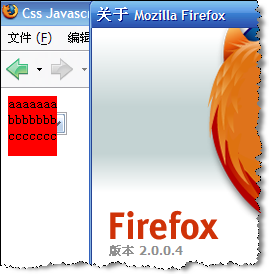
出现上面情况的参考代码:
对于IE6,其实我们也并不是没有办法,虽然我们不得不承认这个办法很“挫”,但是这个是目前最有效的办法。那就是在下拉列表上方加一个iframe,然后让div层浮在iframe上方,这样,就能使div“盖住”下拉列表。如果你要问“为什么”,那么,首先恭喜你,你是个好同学,不像很多人只在网上找解决办法,而不是找知识(例如我-_-b...),然后我会告诉你,这个没有为什么,这个就是IE6的诡异解析。如果一定要问为什么,我只能告诉你,在IE6看来,如果只有div和select,无论你的z-index怎么设置,div的层永远被会被select标签踩在脚底,而iframe则可以爬到select头上,所以,下面的方法之所以能解决问题,是因为iframe在select上方,而div搭着iframe的顺风车也爬到了select的头上,这有点像这样:一条京叭狗(div)平时老是被大狼狗(select)踩到脚底欺负,这天,京叭的主人(iframe)抱着京叭把大狼狗踩到了脚底。这时候京叭自然就在大狼狗的头上了。扯远了,给出解决方案代码:
<!DOCTYPE html PUBLIC "-//W3C//DTD XHTML 1.0 Transitional//EN" "http://www.w3.org/TR/xhtml1/DTD/xhtml1-transitional.dtd">
<html>
<head>
<title>Css Javascript Demo</title>
<meta name="Generator" content="EditPlus"/>
<meta name="Author" content="JustinYoung"/>
<meta name="Keywords" content="CssStandard JavascriptDemo,B/S,JustinYoung"/>
<meta name="Description" content="This demo from JustinYoung's Blog:Yes!B/S!"/>
<meta http-equiv="Content-Type" content="text/html; charset=utf-8"/>
<style type="text/css">
#divUp{
z-index:99;
position:absolute;
background-color:red;
width:100;
height:18;
overflow:hidden;
height:60px;
}
#ddlTest{
width:200;
z-index:1;
}
</style>
<body>
<div id="divUp">aaaaaaa<br>bbbbbbb<br>ccccccc</div>
<br/>
<select id="ddlTest"><option>test0<option>test1<option>test2<option>test3</select>
</html>
<html>
<head>
<title>Css Javascript Demo</title>
<meta name="Generator" content="EditPlus"/>
<meta name="Author" content="JustinYoung"/>
<meta name="Keywords" content="CssStandard JavascriptDemo,B/S,JustinYoung"/>
<meta name="Description" content="This demo from JustinYoung's Blog:Yes!B/S!"/>
<meta http-equiv="Content-Type" content="text/html; charset=utf-8"/>
<style type="text/css">
#divUp{
z-index:99;
position:absolute;
background-color:red;
width:100;
height:18;
overflow:hidden;
height:60px;
}
#ddlTest{
width:200;
z-index:1;
}
</style>
<body>
<div id="divUp">aaaaaaa<br>bbbbbbb<br>ccccccc</div>
<br/>
<select id="ddlTest"><option>test0<option>test1<option>test2<option>test3</select>
</html>
对于IE6,其实我们也并不是没有办法,虽然我们不得不承认这个办法很“挫”,但是这个是目前最有效的办法。那就是在下拉列表上方加一个iframe,然后让div层浮在iframe上方,这样,就能使div“盖住”下拉列表。如果你要问“为什么”,那么,首先恭喜你,你是个好同学,不像很多人只在网上找解决办法,而不是找知识(例如我-_-b...),然后我会告诉你,这个没有为什么,这个就是IE6的诡异解析。如果一定要问为什么,我只能告诉你,在IE6看来,如果只有div和select,无论你的z-index怎么设置,div的层永远被会被select标签踩在脚底,而iframe则可以爬到select头上,所以,下面的方法之所以能解决问题,是因为iframe在select上方,而div搭着iframe的顺风车也爬到了select的头上,这有点像这样:一条京叭狗(div)平时老是被大狼狗(select)踩到脚底欺负,这天,京叭的主人(iframe)抱着京叭把大狼狗踩到了脚底。这时候京叭自然就在大狼狗的头上了。扯远了,给出解决方案代码:
<!DOCTYPE html PUBLIC "-//W3C//DTD XHTML 1.0 Transitional//EN" "http://www.w3.org/TR/xhtml1/DTD/xhtml1-transitional.dtd">
<html>
<head>
<title>Css Javascript Demo</title>
<meta name="Generator" content="EditPlus"/>
<meta name="Author" content="JustinYoung"/>
<meta name="Keywords" content="CssStandard JavascriptDemo,B/S,JustinYoung"/>
<meta name="Description" content="This demo from JustinYoung's Blog:Yes!B/S!"/>
<meta http-equiv="Content-Type" content="text/html; charset=utf-8"/>
<style type="text/css">
body{
font-size:small;
}
#zindexDiv{
position:absolute;
z-index:50;
width:expression(this.nextSibling.offsetWidth);
height:expression(this.nextSibling.offsetHeight);
top:expression(this.nextSibling.offsetTop);
left:expression(this.nextSibling.offsetLeft);
/*background-color:green;在ff中将这句话放出来,你就会明白京叭、狼狗、主人的比喻*/
}
#divUp{
z-index:99;
position:absolute;
background-color:red;
width:100;
height:18;
overflow:hidden;
height:60px;
}
#ddlTest{
width:200;
z-index:1;
}
</style>
<body>
<iframe id="zindexDiv" frameborder="0"></iframe>
<div id="divUp">aaaaaaa<br>bbbbbbb<br>ccccccc</div>
<br/>
<select id="ddlTest"><option>test0<option>test1<option>test2<option>test3</select>
</html>
<html>
<head>
<title>Css Javascript Demo</title>
<meta name="Generator" content="EditPlus"/>
<meta name="Author" content="JustinYoung"/>
<meta name="Keywords" content="CssStandard JavascriptDemo,B/S,JustinYoung"/>
<meta name="Description" content="This demo from JustinYoung's Blog:Yes!B/S!"/>
<meta http-equiv="Content-Type" content="text/html; charset=utf-8"/>
<style type="text/css">
body{
font-size:small;
}
#zindexDiv{
position:absolute;
z-index:50;
width:expression(this.nextSibling.offsetWidth);
height:expression(this.nextSibling.offsetHeight);
top:expression(this.nextSibling.offsetTop);
left:expression(this.nextSibling.offsetLeft);
/*background-color:green;在ff中将这句话放出来,你就会明白京叭、狼狗、主人的比喻*/
}
#divUp{
z-index:99;
position:absolute;
background-color:red;
width:100;
height:18;
overflow:hidden;
height:60px;
}
#ddlTest{
width:200;
z-index:1;
}
</style>
<body>
<iframe id="zindexDiv" frameborder="0"></iframe>
<div id="divUp">aaaaaaa<br>bbbbbbb<br>ccccccc</div>
<br/>
<select id="ddlTest"><option>test0<option>test1<option>test2<option>test3</select>
</html>
keyword:层 列表框,div和列表框,列表框盖住层,怎么让层盖住列表框,列表框和层,下列列表框,如何用层盖住下拉列表框
 评论 (0) All
