 繁體中文
繁體中文当前位置: 首页 > 图文教程 > 网页制作 > CSS样式表 > web标准布局实例教程,用定位轻松解决CSS复杂布局
- CSS样式表
- CSS网页设计 IE8和IE7共存
- CSS2 打印属性让打印HTML文档不出问题
- 制作网页中设计段落缩进的方法
- CSS border 属性使用说明
- CSS border-style 属性使用方法
- CSS border-color 属性使用方法
- CSS border-width 属性使用教程
- CSS padding属性定义边内补白
- CSS margin 属性定义边外补白
- 网页布局教程 掌握CSS网页布局属性
- css 背景样式属性说明
- span margin 设置生效
- html 滚动条在IE6和IE7中兼容性问题
- IE6 两个div有间隙的问题(IE 3px bug)
- CSS 数字和字母将容器撑大问题解决
- 换个角度看页面重构中的语义化
- DIY属于个人开发使用的CSS Reset
- CSS 空格引起网页布局间距问题
- CSS 网页制作时遇到问题的快速参考技巧
- css li 去掉点的样式写法
 CSS样式表 中的 web标准布局实例教程,用定位轻松解决CSS复杂布局
出处:互联网 整理: 软晨网(RuanChen.com) 发布: 2009-09-12 浏览: 377 ::

收藏到网摘: n/a


我相信来经典论坛学习标准的朋友,99%都不是为了进W3C,不是为了成为专业的研究人员,那么大家来的目的是什么呢?很简单,其实都是想通过标准的学习让自己多增加一项技能而已,让自己在找工作的时候不会在被“需要熟练掌握web标准”而难倒,在下面的实例中xhtml并没有什么语意,文章的目的只是让然大家能更好的掌握CSS中相对、绝对定位的用法(新手问此问题的确实很多),及如何有效的结合背景,实现比较复杂的布局。不足之处还望前辈们能指点一二,感谢!
--------------------------------------------------第一步-------------------------------------------
先来随便设计一个布局复杂点的(布局不规整)demo:
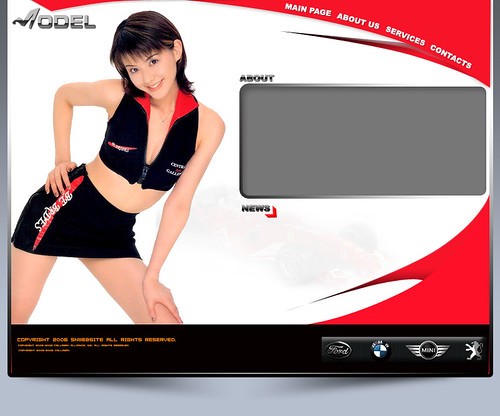
--------------------------------------------------第二步-------------------------------------------
我们来进行代码的编写
<HTML>
<HEAD>
<TITLE>model</TITLE>
<META HTTP-EQUIV="Content-Type" CONTENT="text/html; charset=gb2312">
<style>
html,body{
margin:0;
padding:0;
background:#A1A9B6 url(images/allbg.jpg);
text-align:center;
}
#main{
margin:0 auto;
position:relative; -------------------------------->我是相对定位
width:780px;
height:659px;
background:url(images/model.jpg) no-repeat;
}
#main #menu{
position:absolute;
right:12px;
width:354px;
height:115px;
background:url(images/menu.gif) no-repeat;
}
#main #menu a,#main #menu a#page{
float:left;
width:112px;
height:30px;
}
#main #menu a#about{
width:80px;
height:55px;
}
#main #menu a#services{
width:70px;
height:80px;
}
#main #menu a#contacts{
width:80px;
height:115px;
}
#main #menu a:hover{
background: url(images/menu.gif) no-repeat;
}
#main #menu a#page:hover{
background-position: 0px -115px;
}
#main #menu a#about:hover{
background-position: -112px -115px;
}
#main #menu a#services:hover{
background-position: -192px -115px;
}
#main #menu a#contacts:hover{
background-position: -262px -115px;
}
#main h1{
position:absolute;-------->我是绝对定位,我相对与我的上一级#main来进行定位,因为他设置了position:relative;如果在我的父一级中没有找到position:relative;那我就相对与body来定位了...
top:0;left:1px;
width:151px;
height:56px;
background:url(images/logo.jpg) no-repeat;
}
#main h2{
position:absolute;------------------>我也是绝对定位 我和上面提到的用法一样
top:133px;
right:7px;
width:404px;
height:190px;
background:url(images/about.gif) no-repeat;
}
#main h6{
position:absolute;------------------>我也是绝对定位 我和上面提到的用法一样
bottom:75px;
right:10px;
width:265px;
height:44px;
background:url(images/cars-logo.gif) no-repeat;
}
</style>
</HEAD>
<BODY>
<div id="main">
<div id="menu">
------------------------------------------------------------------------------>这个菜单是怎么工作的呢?
一张图是怎么能实现背景切换呢?
呵呵,其实也很简单?大家知道背景图象中有:图像横纵坐标位置设置,此例子也正是运用这个特性,将拥有不同ID的链接A的背景进行偏移,以达到背景切换的目的。
<a href="#" id="page" title="page"></a>
<a href="#" id="about" title="about"></a>
<a href="#" id="services" title="services"></a>
<a href="#" id="contacts" title="contacts"></a>
</div>
<h1></h1>
<h2></h2>
<h6></h6>
</div>
</BODY>
</HTML>
-----------------------------------------------实际页面效果:---------------------------------------
点击运行可以看到效果:
[Ctrl+A 全选 提示:你可先修改部分代码,再按运行]
[Ctrl+A 全选 提示:你可先修改部分代码,再按运行]
好了,这次的实例教程就结束了,希望对大家以后进行xhtml网页的设计,布局能有所帮助!再见.
 评论 (0) All
