 繁體中文
繁體中文当前位置: 首页 > 图文教程 > 网络编程 > Javascript > JavaScript 验证浏览器是否支持javascript的方法小结
- Javascript
- form中限制文本字节数js代码
- use jscript with List Proxy Server Information
- use jscript List Installed Software
- List Installed Software Features
- List Information About the Binary Files Used by an Application
- List the Codec Files on a Computer
- List the UTC Time on a Computer
- List Installed Hot Fixes
- excel操作之Add Data to a Spreadsheet Cell
- Add Formatted Data to a Spreadsheet
- Apply an AutoFormat to an Excel Spreadsheet
- JavaScript语法着色引擎(demo及打包文件下载)
- 类之Prototype.js学习
- 一款JavaScript压缩工具:X2JSCompactor
- iis6+javascript Add an Extension File
- jscript之Open an Excel Spreadsheet
- jscript之Read an Excel Spreadsheet
- jscript之List Excel Color Values
- 去除图像或链接黑眼圈的两种方法总结
- Add a Formatted Table to a Word Document
 Javascript 中的 JavaScript 验证浏览器是否支持javascript的方法小结
出处:互联网 整理: 软晨网(RuanChen.com) 发布: 2009-09-12 浏览: 365 ::

收藏到网摘: n/a


一些网站只有客户端js的验证,这样就给一些hacher一些可趁之机了,不信大家测试一些网站的注册功能看看,有部分网站只有客户端验证,我为了达到客户端验证,先是判断浏览器是否支持js,如果不支持,提示信息,然后屏蔽掉发送按钮 效果:
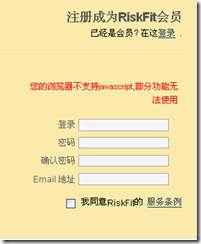
先来看看别的网站是怎么做的:
google.com的登录: 客户端 和服务器端都验证了,并且提示信息一样的
baidu.com 的登录: 屏蔽了密码输入框
http://fanfou.com/register : 客户端和后台都验证了,但是提示的信息方式不一样
http://login.xiaonei.com/Login.do : 用户禁用Js后有提示信息
我的实现步骤:
思想:
1,默认(禁用js)submit按钮式不显示的,如果启用后,就显示submit按钮
2,通过<noscript>.......................</noscript> 显示提示信息
代码:
复制代码 代码如下:
<noscript>
<div style="color:red">您的浏览器不支持javascript,部分功能无法使用</div>
</noscript>
<div id="js_support" style="display:none">
<p id="pSubmit"><input type="submit" name="registerform" value="注 册" onclick="return submitform();"/></p>
</div>
<script type="text/javascript">
$("js_support").style.display = "block";
</script>
 评论 (0) All
